Introducing AI Chat Organizer: Finally Organize Your ChatGPT & Claude Conversations
We built the Chrome extension we wished existed. Folders, tags, cross-platform search, and Markdown export for your AI conversations. 100% privacy-first.
Saidul Islam
Author
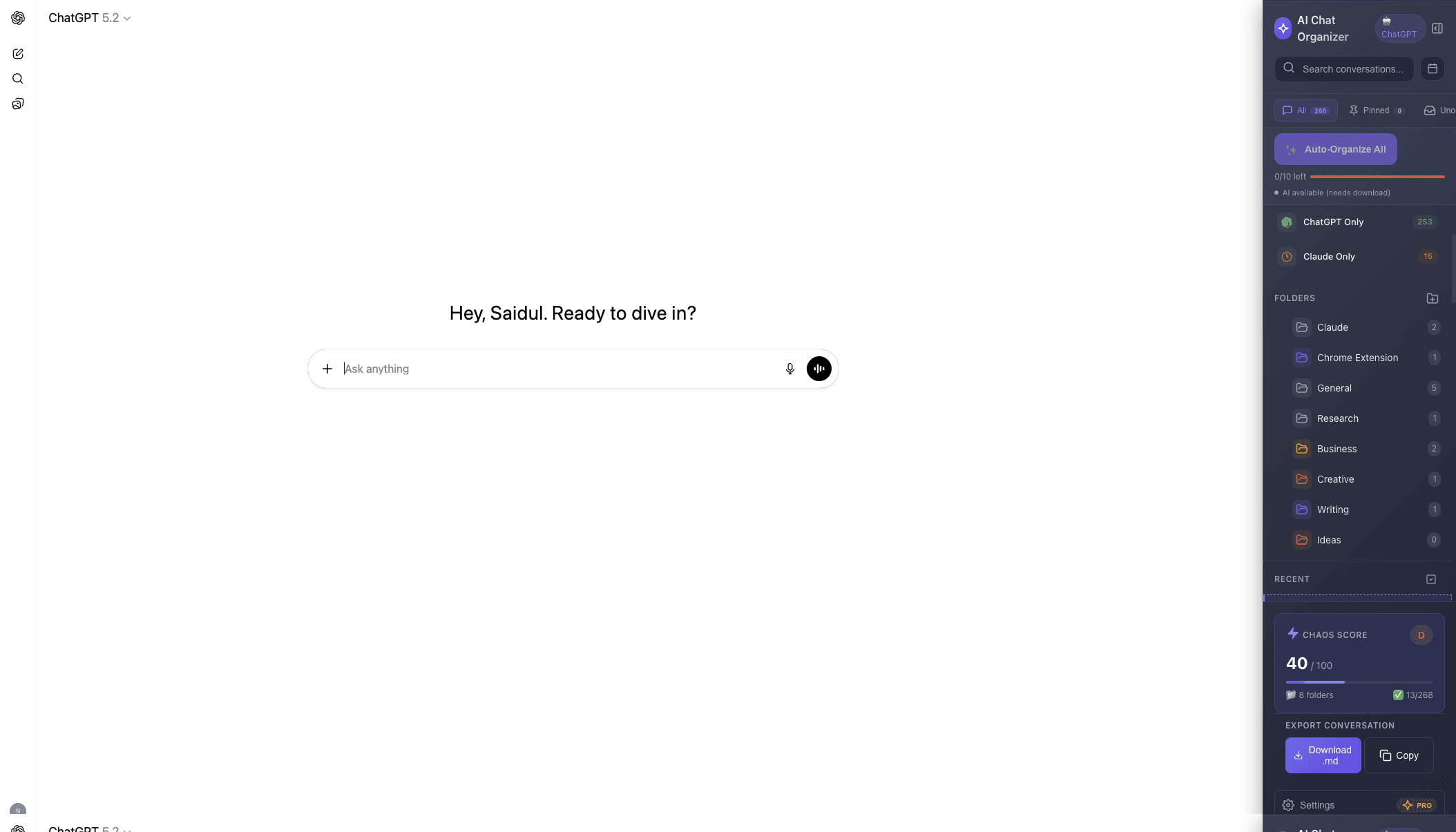
If you use ChatGPT or Claude regularly, you know the pain: hundreds of conversations, no way to organize them, and that one brilliant prompt you need is buried somewhere in the chaos.
We've been there. After losing important conversations one too many times, we decided to build the solution ourselves.
Today, we're launching AI Chat Organizer on the Chrome Web Store.
→ Get it free on Chrome Web Store
The Problem We're Solving
ChatGPT and Claude are incredible tools. But their conversation management is... not.
- No folders. Everything lives in one endless sidebar.
- No tags. You can't categorize conversations by project or topic.
- Weak search. Keywords only, no semantic understanding.
- Platform silos. Use both ChatGPT and Claude? Good luck searching across them.
The result? You waste time scrolling, lose valuable conversations, and end up recreating work you've already done.
What AI Chat Organizer Does
We built the organization layer that ChatGPT and Claude should have had from day one.
📁 Folders & Tags
Create your own folders. Add color-coded tags. Move conversations into folders one at a time or several at once.
🔍 Cross-Platform Search
This is the feature we're most excited about. If you use both ChatGPT AND Claude, you can now search across both platforms simultaneously. Find any conversation in seconds, regardless of which AI you were talking to.
📚 Knowledge Base Export
Your AI conversations are valuable knowledge. Export the chat you are viewing as:
- Markdown to take anywhere
- Obsidian-ready Markdown to drop into your vault
- Notion-ready text to paste into a page
- JSON
You download the file or copy it. There is no live sync to Notion or Obsidian.
🤖 Auto-Organize
Do not want to file every chat by hand? Auto-organize suggests a folder for each chat from its title, using Chrome's on-device Gemini Nano when your computer supports it. The free plan covers 10 chats a month.
🔒 100% Privacy-First
This was non-negotiable for us. All your data stays local in your browser. We never see your conversations. No accounts required for the free tier. No tracking, no analytics on your content.
Free vs Pro
We wanted everyone to benefit from better organization, so the free tier is genuinely useful:
Free (Forever):
- 3 folders
- 5 tags
- 10 searches per day
- Search across ChatGPT and Claude
- Pins and Markdown export
- 159 prompt templates
- Auto-organize for 10 chats a month
Pro ($4.99/month or $79 lifetime):
- Unlimited folders & tags
- Unlimited searches
- All 262 prompt templates
- Unlimited auto-organize
Why We Built This
I'm a heavy ChatGPT and Claude user. My work involves coding, writing, research, brainstorming — and AI helps with all of it.
But I kept losing things. A debugging session that saved me hours? Gone. That perfect prompt for code reviews? Somewhere in 500+ conversations. The pricing analysis I did last month? Who knows.
I tried manual methods: renaming conversations, maintaining an index, copying summaries to Notion. It worked for about two weeks before falling apart.
So we built what we needed: automatic organization that doesn't require discipline to maintain.
What's Next
This is version 1.0, and we're just getting started. On the roadmap:
- Smart folders — Auto-sort conversations by detected topic
- Prompt library expansion — Community-contributed prompts
- Firefox support — Coming soon
We're building this in public and listening to users. If you have feature requests, we want to hear them.
Get Started
AI Chat Organizer is available now on the Chrome Web Store.
- Install the extension
- Open ChatGPT or Claude
- See the new sidebar panel
- Start organizing
It takes 30 seconds to set up and zero effort to maintain.
Related Articles
- How to Organize ChatGPT Conversations: The Complete Guide
- Claude vs ChatGPT: Which AI Assistant is Better in 2026?
- Best AI Chrome Extensions for Productivity
Questions? Feedback? Reach out at [email protected] — we read every message.
Related from NexaSphere: If your ChatGPT and Claude conversations are scattered, AI Chat Organizer gives you folders, tags, and cross-platform search. Free Chrome extension.
Related guides
Part of our AI conversation organization guide:
Free tool
Find any chat in seconds, across ChatGPT and Claude
Search every conversation you have ever had, in one place, without scrolling the sidebar. Free, and it works on the chats you already have.
Works on your existing chats. No account needed.